Monday, October 8, 2012

REDUCE TOP WAIT EVENTS – AN ATTEMPT


This article is prepared to show how I take steps to reduce the top wait events in a busy system running in my environment. As always your comments and suggestions are welcome so that you and I can learn oracle and benefited mutually.

For basic tuning steps and some threshold values please refer to the links below.


These links above give you the basics of performance tuning. Mind this is very old approach and many things have changed from this approach. But when speaking about threshold metrics, you can use those individual queries to check the performance metrics.  

For eg.

select 100*(1 - (v3.value / (v1.value + v2.value))) "Cache Hit Ratio [%]"
from v$sysstat v1, v$sysstat v2, v$sysstat v3
where
v1.name = 'db block gets' and
v2.name = 'consistent gets' and
v3.name = 'physical reads';

The above query is used to calculate the buffer cache hit ratio and typically it should be very high (more than 90%)

Ok, coming to the point where I fine tuned the application is as below.

Scenario: This is an application where batch jobs of huge amount of data (millions of rows) are deleted and updated/inserted on a daily basis. Application team reported that the application is responding very slowly than before as their delete job runs 4~5 folds slower.
While generating the AWR report at the specified time (the time the delete/insert batch job runs), we can find the below report portion.

I have got the instance efficiency percentages as below


You can see from the above that the buffer hit percentage is nearly 100% and comparatively library hit and soft parse % are good as well. We can tune the machine to increase the soft parse % here by making either the SGA to a bigger value or by making use of bind variables (This is an application where many queries are using bind variables and still the value is low, reason being cursor_sharing is set to EXACT which will not take sql statements which use bind variables as used statement and takes every statement as new statement).

While generating the AWR report at the specified time (the time the delete/insert batch job runs), we can find the below report portion.


The Top 5 timed event resulted as above which shows that the reads are taking time in the system. Hence check with the SQL ordered by Reads as below.
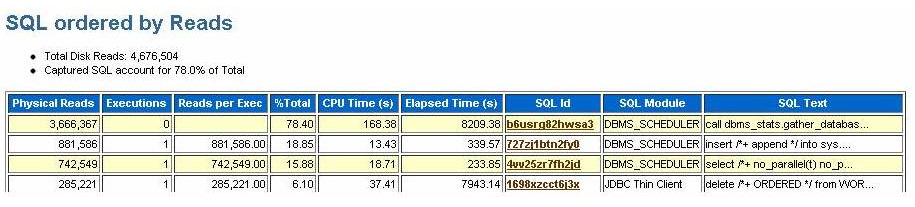


Looking at the statistics from the AWR report, the following query is consuming more reads.

  1. call dbms_stats.gather_database_stats_job_proc ( )        
  2. insert /*+ append */ into sys.ora_temp_1_ds_28645 select /*+ no_parallel(t) no_parallel_index(t) dbms_stats cursor_sharing_exact use_weak_name_resl dynamic_sampling(0) no_monitoring */"OBJECT_ID", "ARCHIVE_DATE", "WF_ID", "REC_TIME", rowid SYS_DS_ALIAS_0 from "EDIAPP"."CORRELATION_SET" sample ( .3482546807) t

Looking at the statistics above, it is clear that most of the reads are consumed by statistics gatherer run by scheduler jobs which is scheduled to run automatically in oracle 10g using DBMS_STATS.
The task is scheduled in WEEKNIGHT_WINDOW of the DBA_SCHEDULER_WINDOWS which starts daily at 10 00 pm EST.

So in order to reduce this waits on db file sequential read, its better we disable this scheduled job as we have statistics gathering run explicitly.

Also init parameter db_file_multiblock_read_count is currently set to 32. Oracle recommends not setting this value manually and letting oracle choose the optimal value. So we can make this alteration as a step to improve the performance.

The other wait events log file sync and log file parallel write are related to each other. By decreasing the log file sync wait even, we can reduce log file parallel write wait event.
From dataguard perspective (as we have dataguard set up for this environment),
For Data Guard with synchronous (SYNC) transport and commit WAIT defaults, log file parallel write also includes the time for the network write and the RFS/redo write to the standby redo logs. This makes us clear that an improved network can improve the waits encountered.

Steps to improve the performance by eliminating the above wait events is as follows.

  • Tune LGWR to get good throughput to disk . eg: Do not put redo logs on RAID 5. à This is checked by Unix admin and made clear files are not in RAID 5  
  • If there are lots of short duration transactions see if it is possible to BATCH transactions together so there are fewer distinct COMMIT operations. Each commit has to have it confirmed that the relevant REDO is on disk. Although commits can be "piggybacked" by Oracle reducing the overall number of commits by batching transactions can have a very beneficial effect. à Apps team should take this into account for improving performance and hence advised them the same.
  • See if any of the processing can use the COMMIT NOWAIT option (be sure to understand the semantics of this before using it). à This is not recommended though
  • See if any activity can safely be done with NOLOGGING / UNRECOVERABLE options. à Compromises high availability and hence is not recommended as we have standby setup
  • Check to see if redologs are large enough. Enlarge the redologs so the logs switch between 15 to 20 minutes. à Current redo log size is 500 mb. We can increase this to 1gb so the log switch takes increased time.

Action plan would be as follows.

  1. Disable scheduled jobs to collect statistics
  2. Change db_file_multiblock_read_count value
  3. Increase redo logs to 1gb
  4. Reduce log buffers from the current size
The above example may provide a good feed to your white paper as this is the live tuning that has been recommended to application team and this works well after reducing log buffers size. This resulted in decreased log file sync.
The statistics were gathered for the database and indexes (for the tables that were affected by the batch job) were rebuilt and the performance is monitored again. This shows a very good increase in performance by reduction of sequential read and scattered read. Application team is satisfied with the performance which is the primary goal.

Thank you!! J Happy tuning!! JJ

Tuesday, August 7, 2012

A simple RMAN crosscheck mess up!!


Today I was attempting to rebuild a standby database as we had done some mess up with the production by placing some of the tables in "nologging" mode and relocating few datafiles due to file system space issues. It is easy to recover the standby by replacing the files from the primary and using the standby_management=manual mode to relocate the files in the standby as well. But the problem is we don't know where we started and where the situation is... Primary database is running fine after the maintenance but we lack the high availability as the standby is a day back. Hence I have decided to rebuild the standby which will take not more than 2~3 hours with a valid backup. Remember this is a database of version 10.2.0.4.0 running on Linux EL5.

Steps that has been done.

1. Backup taken from source database (Primary)
2. Backup pieces were moved to target server and the some of the backup pieces on the primary server is deleted as thinking as this DB is a 11g DB where we have feature of source database is not required to create clone. Then after realising the DB as 10g, again replaced the backups on the server.
3. Control file backup is taken for standby and transfered to the target server.

Now the actual story starts.

On target server.

RMAN> run
{
configure channel device type disk parallel 8;
duplicate target database for standby nofilenamecheck dorecover;
}
2> 3>
RMAN-00571: ===========================================================
RMAN-00569: =============== ERROR MESSAGE STACK FOLLOWS ===============
RMAN-00571: ===========================================================
RMAN-00558: error encountered while parsing input commands
RMAN-01009: syntax error: found "parallel": expecting one of: "clear, connect, debug, format, kbytes, maxopenfiles, maxpiecesize, parms, readrate, rate, send, to, trace"
RMAN-01007: at line 3 column 36 file: standard input

RMAN>
Starting Duplicate Db at 06-AUG-12
using target database control file instead of recovery catalog
allocated channel: ORA_AUX_DISK_1
channel ORA_AUX_DISK_1: sid=541 devtype=DISK
allocated channel: ORA_AUX_DISK_2
channel ORA_AUX_DISK_2: sid=540 devtype=DISK
allocated channel: ORA_AUX_DISK_3
channel ORA_AUX_DISK_3: sid=539 devtype=DISK
allocated channel: ORA_AUX_DISK_4
channel ORA_AUX_DISK_4: sid=538 devtype=DISK
allocated channel: ORA_AUX_DISK_5
channel ORA_AUX_DISK_5: sid=537 devtype=DISK

contents of Memory Script:
{
   set until scn  5170555877;
   restore clone standby controlfile;
   sql clone 'alter database mount standby database';
}
executing Memory Script
..
..
..
executing command: SET NEWNAME

executing command: SET NEWNAME

executing command: SET NEWNAME

Starting restore at 06-AUG-12
allocated channel: ORA_AUX_DISK_1
channel ORA_AUX_DISK_1: sid=537 devtype=DISK
allocated channel: ORA_AUX_DISK_2
channel ORA_AUX_DISK_2: sid=538 devtype=DISK
allocated channel: ORA_AUX_DISK_3
channel ORA_AUX_DISK_3: sid=539 devtype=DISK
allocated channel: ORA_AUX_DISK_4
channel ORA_AUX_DISK_4: sid=540 devtype=DISK
allocated channel: ORA_AUX_DISK_5
channel ORA_AUX_DISK_5: sid=541 devtype=DISK

creating datafile fno=2 name=/fs05/oradata/edisipd/edisipd_UNDOTBS_01.dbf
creating datafile fno=5 name=/fs05/oradata/edisipd/edisipd_UNDOTBS_02.dbf
creating datafile fno=8 name=/fs02/oradata/edisipd/edisipd_EDIAPP_DATA_03.dbf
creating datafile fno=15 name=/fs02/oradata/edisipd/edisipd_EDIAPP_DATA_10.dbf
creating datafile fno=17 name=/fs02/oradata/edisipd/edisipd_EDIAPP_DATA_12.dbf
creating datafile fno=18 name=/fs02/oradata/edisipd/edisipd_EDIAPP_DATA_13.dbf
creating datafile fno=19 name=/fs02/oradata/edisipd/edisipd_EDIAPP_DATA_14.dbf
creating datafile fno=23 name=/fs02/oradata/edisipd/edisipd_EDIAPP_DATA_18.dbf
..
..
..
using channel ORA_AUX_DISK_2
using channel ORA_AUX_DISK_3
using channel ORA_AUX_DISK_4
using channel ORA_AUX_DISK_5

starting media recovery

archive log thread 1 sequence 48527 is already on disk as file /fs01/oradata/edisipd/archive/edisipd_/1_724685163_48527.arc
Oracle Error:
ORA-01547: warning: RECOVER succeeded but OPEN RESETLOGS would get error below
ORA-01194: file 1 needs more recovery to be consistent
ORA-01110: data file 1: '/fs02/oradata/edisipd/edisipd_SYSTEM_01.dbf'

RMAN-00571: ===========================================================
RMAN-00569: =============== ERROR MESSAGE STACK FOLLOWS ===============
RMAN-00571: ===========================================================
RMAN-03002: failure of Duplicate Db command at 08/07/2012 02:49:36
RMAN-03015: error occurred in stored script Memory Script
RMAN-06053: unable to perform media recovery because of missing log
RMAN-06025: no backup of log thread 1 seq 48412 lowscn 5159567844 found to restore
RMAN-06025: no backup of log thread 1 seq 48411 lowscn 5159485436 found to restore
RMAN-06025: no backup of log thread 1 seq 48410 lowscn 5159410674 found to restore
RMAN-06025: no backup of log thread 1 seq 48409 lowscn 5159350092 found to restore
RMAN-06025: no backup of log thread 1 seq 48408 lowscn 5159263205 found to restore

Check the part where it states "creating datafile fno=......
This is the first time I come across this statement in recovery (standby/clone) of a database. I'm not sure why it is creating file rather recovering it from the backup. I waited for sometime so that the recover completes.
Recover completes with error stating missing logs. Ok, this is expected as I don’t have some of the logs in the standby site.

Now, I started the recovery to see where the MRP stuck does, I mean which log MRP is looking for.

SQL> archive log list
Database log mode              Archive Mode
Automatic archival             Enabled
Archive destination            /fs01/oradata/edisipd/archive/edisipd_
Oldest online log sequence     48550
Next log sequence to archive   0
Current log sequence           48552
SQL> select process, sequence#, status from v$managed_Standby;

PROCESS    SEQUENCE# STATUS
--------- ---------- ------------
ARCH               0 CONNECTED
RFS                0 IDLE
RFS                0 IDLE
RFS                0 IDLE
MRP0               3 WAIT_FOR_GAP

9 rows selected.

This is to my shock!! MRP is waiting for sequence number 3. Man! This is a full backup you are recovering and why in the name of God, MRP looks for sequence# 3? I have to go years back for the log sequence# 3 :-)

I thought for a second and reran the create controlfile statement on the primary database to make sure I have the correct controlfile, transferred it to standby site and started recovery after mounting the database.

SQL> recover standby database;
ORA-00279: change 310139 generated at 07/18/2010 13:52:22 needed for thread 1
ORA-00289: suggestion :
/fs01/oradata/edisipd/archive/edisipd_/1_724685163_3.arc
ORA-00280: change 310139 for thread 1 is in sequence #3


Specify log: {<RET>=suggested | filename | AUTO | CANCEL}
auto
ORA-00308: cannot open archived log
'/fs01/oradata/edisipd/archive/edisipd_/1_724685163_3.arc'
ORA-27037: unable to obtain file status
Linux-x86_64 Error: 2: No such file or directory
Additional information: 3

This again is looking for sequence# 3. So something is not right. But what is not right?
Then I checked manually myself with the backup pieces on both the servers, whether both the servers have equal number of files and their sizes. They are perfect.
Now I logged into primary database RMAN to see how many pieces have been produced while taking backup. 14 pieces have been produced and I have 14 pieces on the physical file system. So still I couldn't find what is wrong.

Now, once again I counted the number of pieces produced and got this..

RMAN> list backup tag ‘FORSTANDBY’;
..
..
..
  57      Full 5163187056 06-AUG-12 /fs04/oradata/edisipd/edisipd_EDIAPP_INDEX_12.dbf
  69      Full 5163187056 06-AUG-12 /fs05/oradata/edisipd/edisipd_EDIAPP_INDEX_24.dbf
  77      Full 5163187056 06-AUG-12 /fs06/oradata/edisipd/edisipd_EDIADT_DATA_02.dbf

BS Key  Type LV Size       Device Type Elapsed Time Completion Time
------- ---- -- ---------- ----------- ------------ ---------------
31223   Full    3.16G      DISK        00:28:35     06-AUG-12
        BP Key: 31464   Status: EXPIRED  Compressed: YES  Tag: FORSTANDBY
        Piece Name: /backups/stbkp/ForStandby_sknhuobu_1_1
  List of Datafiles in backup set 31223
  File LV Type Ckp SCN    Ckp Time  Name
  ---- -- ---- ---------- --------- ----
  23      Full 5163317451 06-AUG-12 /fs02/oradata/edisipd/edisipd_EDIAPP_DATA_18.dbf
  25      Full 5163317451 06-AUG-12 /fs02/oradata/edisipd/edisipd_EDIAPP_DATA_20.dbf
  54      Full 5163317451 06-AUG-12 /fs04/oradata/edisipd/edisipd_EDIAPP_INDEX_09.dbf
  64      Full 5163317451 06-AUG-12 /fs05/oradata/edisipd/edisipd_EDIAPP_INDEX_19.dbf

BS Key  Type LV Size       Device Type Elapsed Time Completion Time
------- ---- -- ---------- ----------- ------------ ---------------
31224   Full    4.03G      DISK        00:45:33     06-AUG-12
        BP Key: 31465   Status: EXPIRED  Compressed: YES  Tag: FORSTANDBY
        Piece Name: /backups/stbkp/ForStandby_sinhunrb_1_1
  List of Datafiles in backup set 31224
  File LV Type Ckp SCN    Ckp Time  Name
  ---- -- ---- ---------- --------- ----
..
..
..

Some of the backup pieces were in EXPIRED status. I now remember my colleague called me today morning to inform that she moved some of the backup pieces to other file system and issued the "crosscheck backup" RMAN command when the files where deleted from primary server after transfer to standby site. After this the backup pieces were restored to the file system so the files were not cataloged to the control file.


The reason why “create datafile” is issued by RMAN is now clear. Controlfile has the details about the datafiles but the backup pieces were missing to restore/recover. Hence it creates the datafiles on the given name and it should start recover from the beginning and hence looking for sequence# 3. My confusion is now at a halt. J

Now I crosschecked the pieces once again using RMAN crosscheck command so that these pieces were cataloged to the control file. Then I started the cloning for standby which ran perfect as expected.
For the detailed steps on creating a standby database using RMAN please check the below link.

Thank you!!